Every number below was checked against both vendors’ docs and pricing pages on November 14, 2026. Reddit reports are labelled as such. No affiliate ties.
Sources: Lovable hosting docs, Cursor Apps docs, Cursor models and pricing (checked November 14, 2026)
Key takeaways
- → Cursor’s 2026 pricing is new: Free, Plus $8, Premium $30, Super $100, Ultra $200. Pro at $20 is legacy. (pricing)
- → Lovable bills credits: Pro from $25 for 100 credits a month; credits also pay for your app’s backend. (pricing)
- → The hybrid works, with caveats: a local clone writes to your live database; pushes don’t deploy edge functions or migrations. (workflow)
- → Training: Lovable may train on Free and Pro data since September 9, 2026 unless you opt out; Cursor’s Privacy Mode keeps code out of training. (privacy)
The core difference in one table
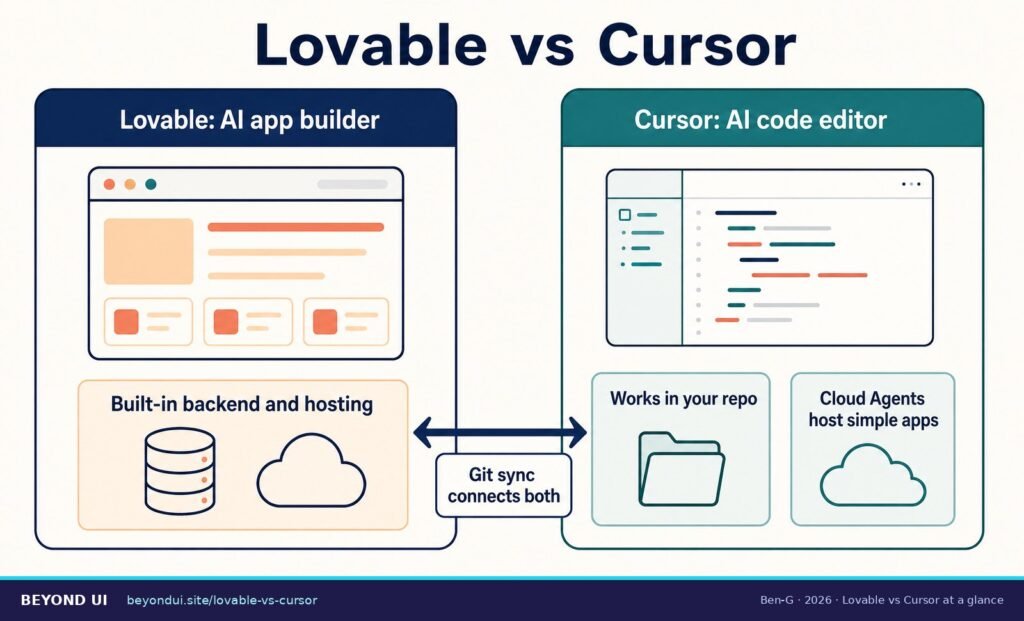
Lovable calls itself “a full-stack AI development platform” (Lovable docs); Cursor says it “is based upon the VS Code codebase” (Cursor docs).
| Dimension | Lovable | Cursor |
|---|---|---|
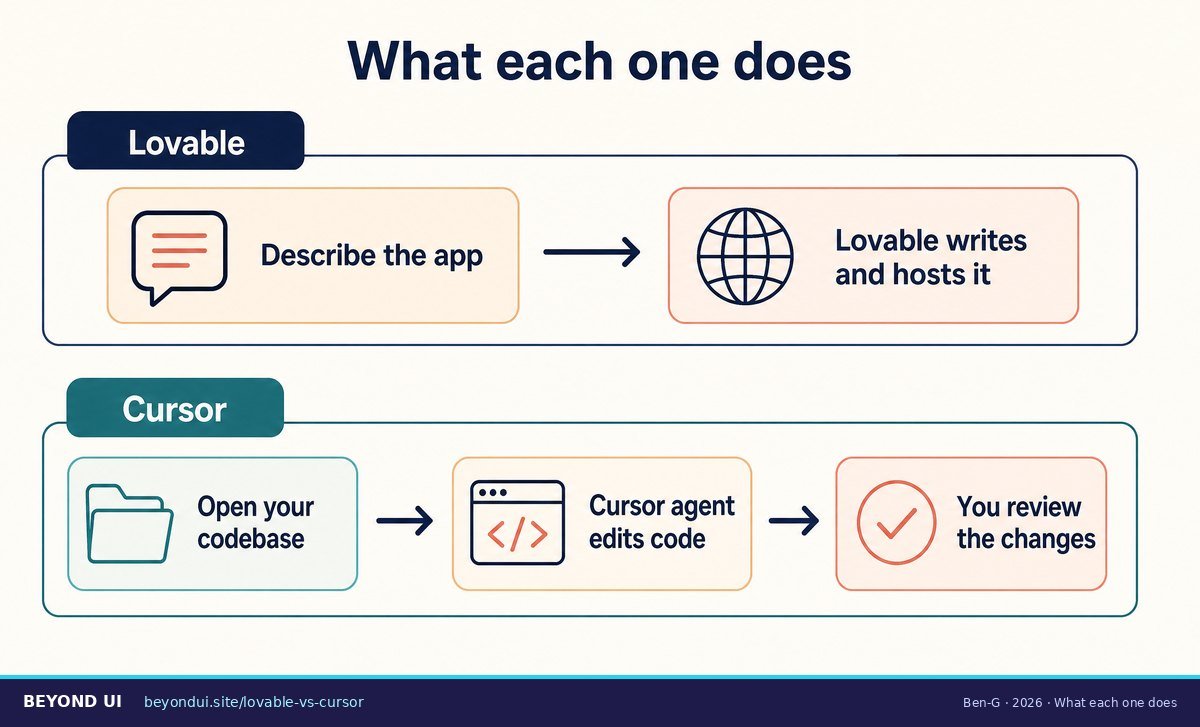
| What it is | AI app builder: frontend, backend, database, auth and integrations from a prompt | AI coding agent and code editor built on the VS Code codebase |
| Where it runs | Browser; also desktop apps for macOS and Windows on all plans | Desktop app (macOS 12+, Windows 10+, Linux), CLI, web agents, iOS (Premium and up), JetBrains via ACP (paid) |
| Who writes code | Lovable’s agent; you edit on paid plans | You and Cursor’s agent |
| Backend and database | Built in (Cloud, on Supabase’s open-source foundation) | Only through Cloud Agent Apps (auto-provisioned Postgres); otherwise bring your own |
| Hosting | Included; lovable.app URL free on all plans, custom domains on paid plans | Apps on paid plans with Cloud Agents; otherwise deploy it yourself |
| Git | Two-way sync with GitHub, GitLab or Bitbucket on all plans; export only | Any Git repo; Cloud Agents push branches; Origin forge in early beta |
| Pricing unit | Credits (100 to 10,000 a month) | Flat tiers with a weekly usage pool; Teams per seat |
Sources: Lovable desktop app, Lovable Cloud, Cursor quickstart, Cursor JetBrains, Cursor iOS.
What you pay
Cursor plans (individual)
| Plan | Monthly | Annual | Included usage | What you get |
|---|---|---|---|---|
| Free | $0 | n/a | Limited | Agent and Chat with limited usage |
| Plus | $8 | $80 | Base weekly pool | Cursor’s own models only. No Cloud Agents, Apps, Bugbot, Origin, third-party models or own API keys |
| Premium | $30 | $300 | 4x Plus | Adds Cloud Agents, Apps, Origin, Bugbot, third-party models at API list price |
| Super | $100 | $1,000 | 15x Plus | Premium plus priority model access at peak times |
| Ultra | $200 | $2,000 | 50x Plus | Super plus earliest access to new products and models |
| Teams | $30, $100 or $200 per seat | Not stated | Matches the seat tier | Premium, Super or Ultra seats; SSO, team Privacy Mode; no Plus seats; $0.25 per 1M token Cursor Token Rate on third-party models |
| Legacy (existing customers) | Pro $20, Pro+ $60, Ultra $200 | Not stated | Two monthly pools | Existing customers only; switching is “optional and permanent” |
Excl. tax. Monthly and annual prices: Cursor models and pricing (the pricing page shows monthly only); also cursor.com/pricing, legacy plans.
Lovable plans
| Plan | Monthly | Annual | Included usage | Top-ups |
|---|---|---|---|---|
| Free | $0 | n/a | 5 daily build credits (max 30 a month) plus monthly grants of 20 Cloud, 4 AI and 1 connector credit | Not available |
| Pro | $25 (100 credits) to $2,250 (10,000 credits) | $250 ($21 a month) to $22,500 ($1,875 a month) | Monthly credits plus 5 daily build credits, no monthly cap | $15 per 50 credits |
| Business | $50 (100 credits) to $4,300 (10,000 credits) | $500 ($42 a month) to $43,000 ($3,584 a month) | As Pro; adds SSO and training exclusion by default | $30 per 50 credits |
| Enterprise | Contact sales | Contract | Volume-based credits | Not offered |
Sources: Lovable plans, credits and usage, top-ups.
What “usage” means on each
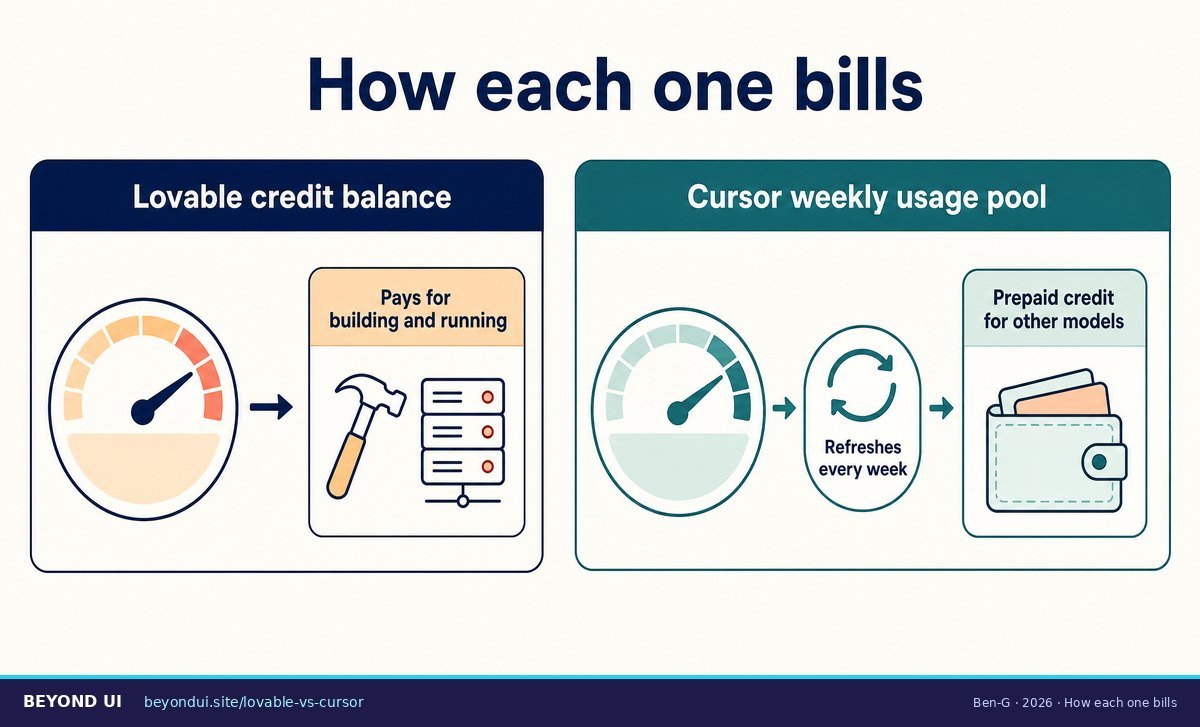
Cursor: one weekly pool for Cursor’s own models, “shared across everything on your subscription”, including the Grok apps; its size is only given relative to Plus. Claude, GPT and Gemini “aren’t part of the included pool”: on Premium and up they’re billed at API list price from prepaid credit. Beyond the pool, Composer 2.5 costs $0.5 input and $2.5 output per 1M tokens. Top-ups expire 365 days after purchase (usage limits).
Lovable: one credit balance pays for building, chat, Cloud backend and AI features in your app. A live site alone uses no credits (hosting docs); at zero, Cloud-backed apps pause but pages stay live. See our Lovable credits explainer.
Our arithmetic: billed annually, Cursor Premium is $25 a month ($300 ÷ 12); Lovable states $21 for Pro 100. Sticker prices only: Lovable credits buy building plus hosting, Cursor’s pool buys coding tokens.
Which fits you?
Six questions; the tool uses the same rules as the decision guide and both vendors’ list prices.
Building a full app: backend, auth, hosting
Lovable. “Lovable hosts your app and includes a built-in backend with database, authentication, storage, edge functions, and AI, no infrastructure setup required.” (Cloud docs). Your users can sign in with email, phone, Google, Apple, Microsoft, SAML SSO or OIDC (auth docs). Custom domains need a paid plan. “Your plan does not cap visitors or bandwidth”, though Free workspaces’ apps created from May 13, 2026 are limited to 1,000 server requests per project per 10 seconds. A security scan runs on every publish, but “Findings do not block publishing by default” (publish docs). See Lovable hosting.
Cursor Apps. “Cloud Agents can build a working web app, like a dashboard, portal, or microsite… Cursor handles the hosting, database, auth, and secrets” (Apps docs). Start from scratch (a new Origin repo) or say “Deploy this repo as an app”; it is “not supported locally.” Before publishing, four always-on checks block secrets, credential files, .env files and source maps, plus an AI security review.
- Auth is gatekeeping: “Private and team apps sit behind Cursor sign-in”; individual plans can share publicly. No login system for your own customers is described.
- Not published: Apps prices, quotas, uptime, custom domains, supported frameworks, or whether hosting draws on your pool.
- Terms: “hosting is separate from, and is not part of, our services, and is provided ‘as is’ and ‘as available.'”
For a customer-facing product with logins, Lovable (or another builder: Replit vs Lovable, Lovable vs Bolt) does more out of the box. For an internal dashboard behind Cursor sign-in, Apps fits.
Working on code: editor, Git, local dev
Cursor uses the Open VSX registry, so “not all VS Code extensions may be listed or work exactly the same way” (migration help). Cloud Agents clone from GitHub, GitLab, Azure DevOps or Bitbucket and “work on a separate branch” (Cloud Agents docs).
Lovable: “Code editing is available on paid plans. On the Free plan the editor is read-only” (code mode docs). Full .zip download is also paid-only. Git sync with GitHub, GitLab and Bitbucket works on all plans, but “Export only. You can’t import an existing repository into Lovable” (Git sync docs). Outside code enters only as a ZIP (up to 250 MB) or guided import from Replit, Bolt, Base44 and others (import docs).
Stack note: Lovable apps created from May 13, 2026 use TanStack Start, which runs server code; older ones are React + Vite (ownership docs). That matters locally, below.
The hybrid workflow, step by step
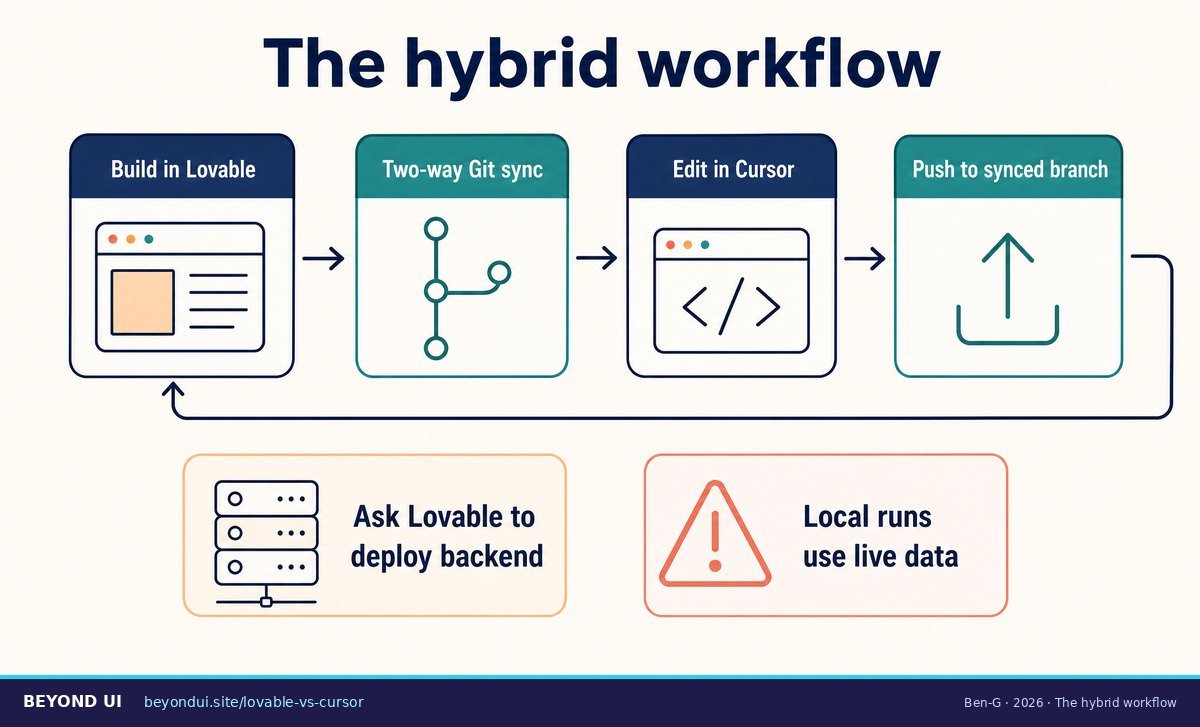
- Connect Git sync in project settings; Lovable creates the repository.
- Clone the repo into Cursor. Lovable “edits and syncs one branch at a time”, usually main.
- Work on a feature branch in Cursor. Don’t force-push, rebase or squash commits already on the synced branch.
- Test with care: a local run with the repo’s .env “reads and writes the same backend as your published app”. Use test accounts.
- Merge into the synced branch. “Commits pushed to the synced branch appear back in your Lovable project.”
- Ask Lovable to deploy backend changes. “Lovable does not deploy a changed Edge Function or run a new migration file when your commits sync”, so request it in chat.
- Tell Lovable what changed, then publish again. “Lovable treats code you wrote the same as code it generated, and it can change either in a later request.”
Second route: the Lovable MCP server. “External MCP clients such as Claude Desktop and Cursor can connect to this workspace through mcp.lovable.dev” (privacy and security settings). Cursor then drives Lovable projects instead of editing a clone. It is always on for Free and Pro, default on for Business, default off on Enterprise (Lovable MCP guide).
Leaving Lovable? Cursor doesn’t manage Lovable Cloud, so the backend stays or moves: see Lovable Cloud to Supabase.
Privacy and training
| Question | Lovable | Cursor |
|---|---|---|
| Trains on your data? | Free and Pro: may, since September 9, 2026. Business, Enterprise: excluded by default | Not with Privacy Mode on, by Cursor or model providers |
| How to stop it | Account-level opt-out setting, per user, any time | Privacy Mode; default on for teams (individual default not stated) |
| Third parties | Publishes a sub-processor list | Prompts and code context go to providers such as OpenAI, Anthropic and Google |
| Certifications | SOC 2 Type II, ISO 27001:2022, AIUC-1, GDPR, DPA | SOC 2 Type II, ISO/IEC 27001:2022, ISO/IEC 42001:2023, AIUC-1 |
Sources: Lovable data opt-out, Lovable for Enterprise, Cursor privacy help, Cursor security.
What users report
| Thread | Date | What they reported | Leans |
|---|---|---|---|
| Switching to Cursor | March 25, 2026 | Six hours in Cursor used 7% of the allowance on a GBP 20 plan; a commenter put similar work at about GBP 80 of Lovable usage | Cursor, on cost |
| Lovable to Cursor | September 16, 2026 | Non-coder: three prompts filled 60% of the context window in about 15 minutes | Lovable |
| Is Cursor a logical next step? | December 17, 2025 | Replies: Cursor is an “intermediate” tool | Depends on skill |
| Can I connect Lovable to Cursor? | December 24, 2025 | Accepted answer: two-way GitHub sync, clone, edit in Cursor, push | Both |
| Need coding to switch? | November 1, 2026 | Four-role booking app in about 3 weeks for about 3,000 credits; top reply: stay put | Lovable |
| Moving my SaaS from Lovable | March 15, 2026 | Rewrote almost half of an SEO SaaS in Cursor within days | Cursor |
| I scanned 31 AI-built repos | April 9, 2026 | Static analysis: Cursor repos had the most code smells per file | Lovable |
| 14 MVPs reviewed | May 21, 2026 | 4 of 14 MVPs let any signed-in user read other tenants’ rows | Neither |
On the cost anecdote: the poster’s GBP 20 plan matches no current Cursor price ($20 Pro is legacy), so the 7% says little about today’s plans.
“Ive been working on cursor today for about 6 hours and used 7% of my allowance.”
r/lovable, March 2026
“I wouldn’t recommend cursor if you don’t have tech background”
r/cursor reply, September 2026
“Cursor is trying hard to be beginner friendly… but still in its core, its an IDE.”
r/vibecoding reply, December 2025
Who should pick which
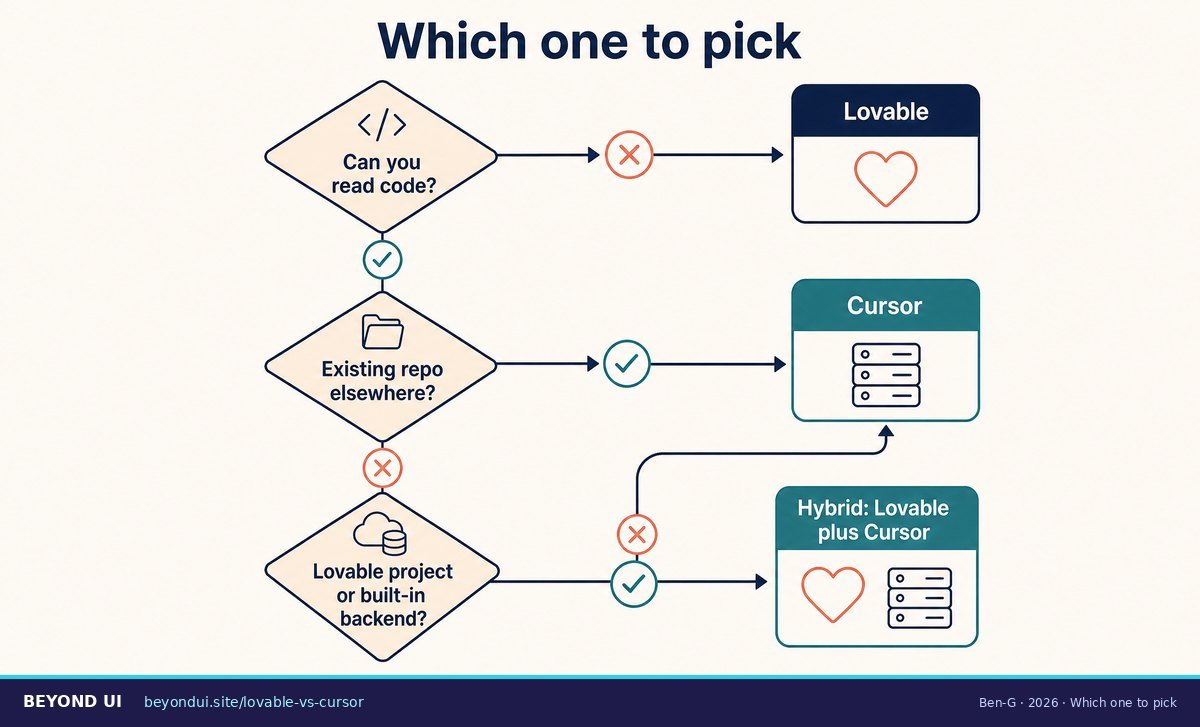
- Pick Lovable if you want a working, hosted app with user logins and a database without touching code. Free gets 5 daily credits (up to 30 a month); Pro starts at $25, Business (with SSO) at $50.
- Pick Cursor if you code, have a repo or your own backend. Plus ($8) covers Cursor’s models; Premium ($30) adds Cloud Agents, Apps and third-party models.
- Use both if you can read code and want Lovable’s backend and hosting with Cursor’s editing. Git sync is on every Lovable plan, so it can start at $0; Lovable Pro 100 plus Cursor Plus is $33 a month (our arithmetic).
- Teams: Lovable has unlimited members, but collaborators spend the owner’s credits; Cursor Teams cost from $30 per seat.
- Weighing Vercel’s v0 instead? Our Lovable vs v0 comparison covers pricing, backend, Git and hosting.
Frequently asked questions
Is Cursor better than Lovable?
They do different jobs: Cursor is an AI code editor for people who code; Lovable builds and hosts a full app from prompts. Sources: Cursor docs, Lovable docs.
Lovable or Cursor for beginners?
Lovable: nothing to install, and it generates the backend and auth for you. Reddit users without coding skills were repeatedly told to go back to Lovable (user reports). Sources: Lovable getting started, r/cursor thread.
How do I move a Lovable project to Cursor?
Turn on Git sync, clone the repo into Cursor and push to the synced branch. Local runs hit your live database, AI calls fail locally on apps from May 13, 2026, and Lovable must deploy edge functions and migrations. Sources: Lovable Git sync docs.
Can Cursor host apps like Lovable?
Partly: Cloud Agents can host a dashboard, portal or microsite with Postgres, on Premium ($30 a month) and up, Teams, or a legacy paid plan. Access is via Cursor sign-in or a public link; no limits are published. Sources: Cursor Apps docs, Cursor pricing docs.
How does Cursor pricing compare with Lovable?
Cursor: Free, Plus $8, Premium $30, Super $100 and Ultra $200 a month, with a weekly usage pool. Lovable: Free, Pro from $25 for 100 credits, Business from $50. Sources: Cursor pricing docs, Lovable plans.
Is Cursor a fork of VS Code?
Cursor’s own docs say it “is based upon the VS Code codebase”; the word fork comes from third parties, including Lovable’s comparison page. Sources: Cursor VS Code migration, Cursor help.
Can Cursor connect to Lovable directly?
Yes, through the Lovable MCP server at mcp.lovable.dev; Lovable’s docs name Cursor as a client. It is always on for Free and Pro workspaces. Sources: Lovable privacy and security settings.
Do Lovable or Cursor train AI on my code?
Lovable may train on Free and Pro data since September 9, 2026 unless you opt out; Business and Enterprise are excluded by default. Cursor’s Privacy Mode keeps code out of training. Sources: Lovable data opt-out, Cursor privacy.
Can I bring a Cursor project into Lovable?
Only as a ZIP import of up to 250 MB, available on all plans. Lovable’s Git sync is export only, so it can’t link to an existing repository. Sources: Lovable import docs, Lovable Git sync docs.
About this comparison
Written by Ben-G, a practitioner who builds with AI coding tools and checks every number against vendor docs; no affiliate ties with Lovable or Cursor. On November 14, 2026 we fetched both vendors’ docs and pricing pages and Lovable’s comparison guide, and read 20 Reddit threads. We found no Lovable comparison page from Cursor.
| Claim in Lovable’s guide (March 5, 2026) | What the docs say now |
|---|---|
| Cursor “produces code files, not live applications” | Cursor Apps build and host web apps from Cloud Agents |
| Cursor’s paid tiers “start around the $20/month range” | Plus $8, Premium $30; Pro at $20 is legacy |
| Cursor has “no native workspace sharing” | Teams plans, shared agent runs, team Apps; real-time co-editing isn’t documented |
| Lovable runs React and Tailwind with Supabase | New apps since May 13, 2026 use TanStack Start |
| Data opt-out listed as a Business feature | Free and Pro users can opt out per account; Business is excluded by default |
| Cursor is “Built as a fork of Visual Studio Code” | Cursor says “based upon the VS Code codebase” |
- Our arithmetic: annual-to-monthly prices, combined hybrid prices, the decision tool.
- Not in the docs: Cursor’s pool sizes, Bugbot rates, Teams annual prices, Apps limits and prices, end-user auth in Apps, and which models Lovable’s agent uses.
- Minor inconsistency: Cursor’s docs call Plus usage “Base”, its pricing page says “Basic”.
AI assistance was used for research and drafting; all facts were checked against the linked sources.
Sources
- Lovable hosting docs — docs.lovable.dev
- Cursor Apps docs — cursor.com
- Cursor models and pricing — cursor.com
- Lovable docs — docs.lovable.dev
- Cursor docs — cursor.com
- Lovable desktop app — docs.lovable.dev
- Lovable Cloud — docs.lovable.dev
- Cursor quickstart — cursor.com
- Cursor JetBrains — cursor.com
- Cursor iOS — cursor.com
- lovable.dev guide — lovable.dev
- Cursor legacy plans — cursor.com
- cursor.com/pricing — cursor.com
- Lovable plans — docs.lovable.dev
- credits and usage — docs.lovable.dev
- top-ups — docs.lovable.dev
- usage limits — cursor.com
- auth docs — docs.lovable.dev
- publish docs — docs.lovable.dev
- migration help — cursor.com
- Cloud Agents docs — cursor.com
- code mode docs — docs.lovable.dev
- Git sync docs — docs.lovable.dev
- import docs — docs.lovable.dev
- ownership docs — docs.lovable.dev
- privacy and security settings — docs.lovable.dev
- Lovable data opt-out — docs.lovable.dev
- Lovable for Enterprise — docs.lovable.dev
- Cursor privacy help — cursor.com
- Cursor security — cursor.com
- Switching to Cursor — reddit.com
- Lovable to Cursor — reddit.com
- Is Cursor a logical next step? — reddit.com
- Can I connect Lovable to Cursor? — reddit.com
- Need coding to switch? — reddit.com
- Moving my SaaS from Lovable — reddit.com
- I scanned 31 AI-built repos — reddit.com
- 14 MVPs reviewed — reddit.com
- Cursor docs — cursor.com
- Lovable getting started — docs.lovable.dev